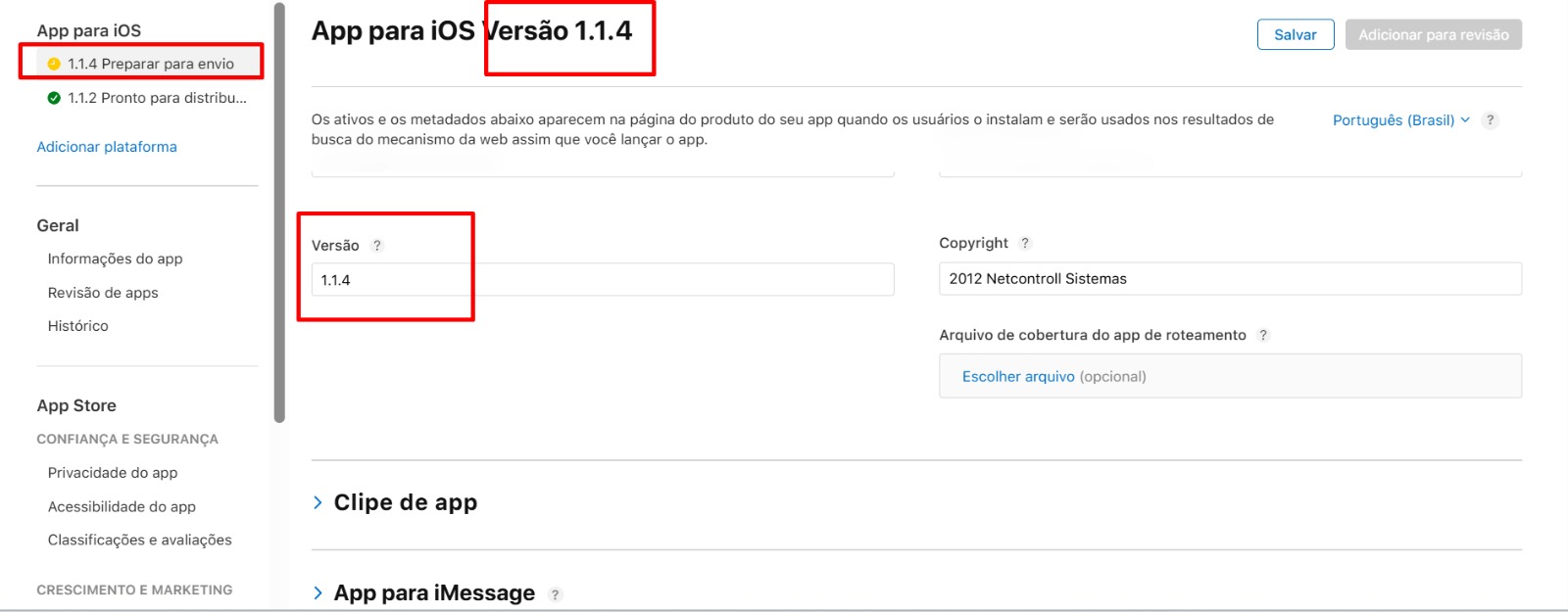
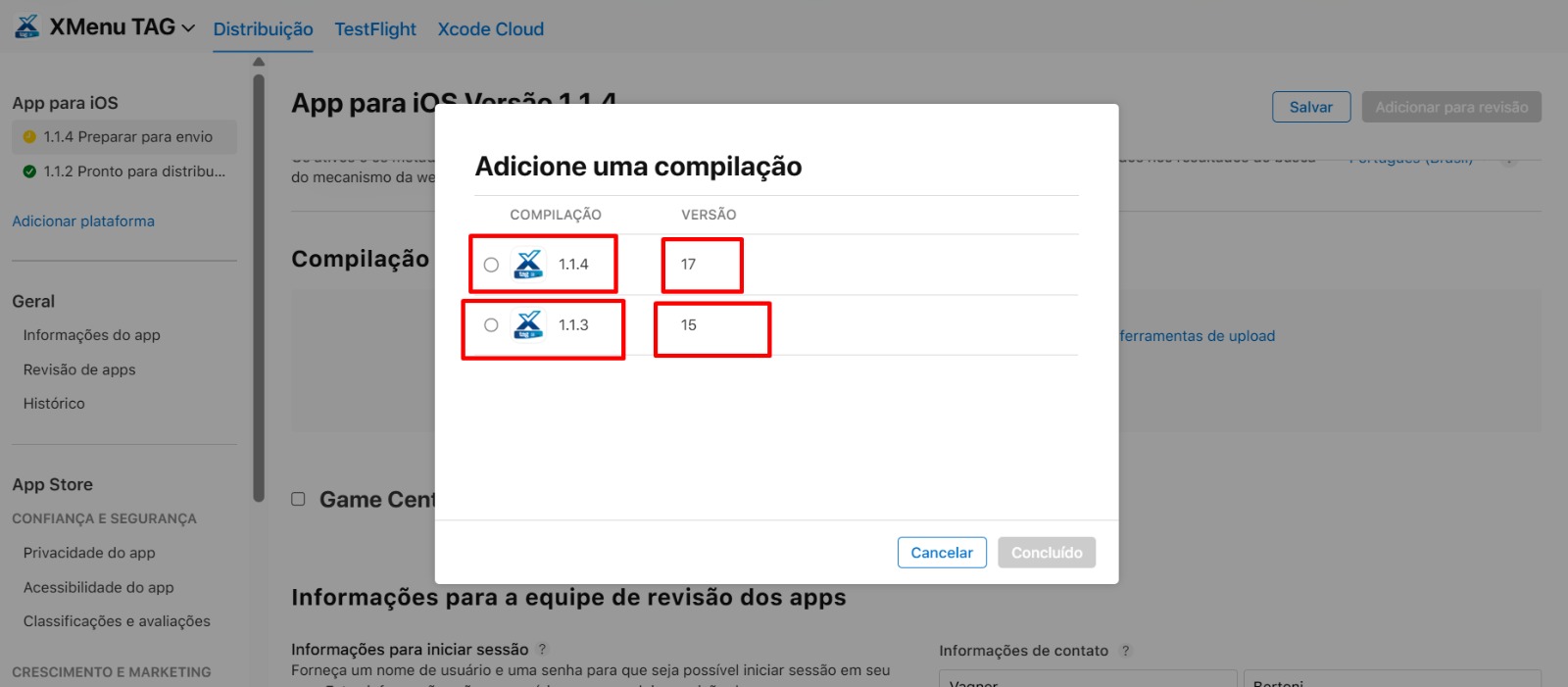
Sorry, I forgot to include the config.xml and the Voltbuilder.log.
I have the following error message for an unsuccessful build.
Set PRODUCT_BUNDLE_IDENTIFIER to com.netcontroll.xtag.
Set PRODUCT_NAME to XMenu Tag.
Set MARKETING_VERSION to 1.1.4.
Set CURRENT_PROJECT_VERSION to 17.

Project Setting Files:

    config.xml:
<widget xmlns="http://www.w3.org/ns/widgets" xmlns:android="http://schemas.android.com/apk/res/android" android-versionCode="18" id="com.netcontroll.xtag" ios-CFBundleVersion="17" version="1.1.4">
    <name>XMenu Tag</name>
    <description>App XTag</description>
    <platform name="ios">
        <edit-config file="*-Info.plist" mode="overwrite" target="CFBundleShortVersionString">
            <string>1.1.4</string>
        </edit-config>
        <edit-config file="*-Info.plist" mode="overwrite" target="CFBundleVersion">
            <string>17</string>
        </edit-config>


/platforms/ios/Pods/Pods.xcodeproj: warning: The iOS deployment target 'IPHONEOS_DEPLOYMENT_TARGET' is set to 11.0, but the range of supported deployment target versions is 12.0 to 18.4.99. (in target 'OneSignalXCFramework' from project 'Pods')
note: Disabling previews because SWIFT_VERSION is set and SWIFT_OPTIMIZATION_LEVEL=-O, expected -Onone (in target 'OneSignalXCFramework' from project 'Pods')
note: Disabling previews because SWIFT_VERSION is set and SWIFT_OPTIMIZATION_LEVEL=-O, expected -Onone (in target 'Pods-App' from project 'Pods')
note: Disabling previews because SWIFT_VERSION is set and SWIFT_OPTIMIZATION_LEVEL=-Owholemodule, expected -Onone (in target 'CordovaPlugins' from project 'CordovaPlugins')
note: Disabling previews because SWIFT_VERSION is set and SWIFT_OPTIMIZATION_LEVEL=-Owholemodule, expected -Onone (in target 'Cordova' from project 'Cordova')
note: Disabling previews because SWIFT_VERSION is set and SWIFT_OPTIMIZATION_LEVEL=-O, expected -Onone (in target 'App' from project 'App')
** ARCHIVE SUCCEEDED **

Adding xcodebuildArg: ALWAYS_EMBED_SWIFT_STANDARD_LIBRARIES = NO
Adding xcodebuildArg: LD_RUNPATH_SEARCH_PATHS = "@executable_path/Frameworks"
2026-01-23 14:34:20.843 xcodebuild[97240:172009] [MT] IDEDistribution: -[IDEDistributionLogging _createLoggingBundleAtPath:]: Created bundle at path "/var/folders/kn/8gvj8x9d565gqj7094x61tcw0000gn/T/App_2026-01-23_14-34-20.841.xcdistributionlogs".
2026-01-23 14:34:21.198 xcodebuild[97240:172009] [MT] IDEDistribution: Command line name "app-store" is deprecated. Use "app-store-connect" instead.
Exported App to: /platforms/ios/build/Release-iphoneos
** EXPORT SUCCEEDED **

No scripts found for hook "after_compile".
No scripts found for hook "after_build".

2026-01-23 14:34:24,515 - Validating app for upload...
2026-01-23 14:35:03,145 - Output: Running altool at path '/Applications/Xcode.app/Contents/SharedFrameworks/ContentDeliveryServices.framework/Frameworks/AppStoreService.framework/Support/altool'...
2026-01-23 14:34:47.902 ERROR: [altool.6000006D8180] [ContentDelivery.Uploader.6000006D8180] Validation failed (409) Invalid Version. The build with the version “9” can’t be imported because a later version has been closed for new build submissions. Choose a different version number. (ID: fd06122d-c549-46ee-a231-a422998aa30a)
2026-01-23 14:34:47.903 ERROR: [altool.6000006D8180] [ContentDelivery.Uploader.6000006D8180] Validation failed (409) This bundle is invalid. The value for key CFBundleShortVersionString [1.1.4] in the Info.plist file must contain a higher version than that of the previously approved version [14]. Please find more information about CFBundleShortVersionString at https://developer.apple.com/documentation/bundleresources/information_property_list/cfbundleshortversionstring (ID: a6cf0218-d745-4217-b454-84a6a3ec4bf1)
2026-01-23 14:35:03.069  INFO: [altool.6000006D8180] [ContentDelivery.Uploader.6000006D8180]
=======================================
VERIFY FAILED with 2 errors, 0 warnings, 0 messages
=======================================
2026-01-23 14:35:03.071 ERROR: [altool.6000006D8180] Validation failed for '/ios.app-store.ipa'.
2026-01-23 14:35:03.071 ERROR: [altool.6000006D8180] Validation failed Invalid Version. The build with the version “9” can’t be imported because a later version has been closed for new build submissions. Choose a different version number. (ID: fd06122d-c549-46ee-a231-a422998aa30a) (409)
 {
    NSLocalizedDescription = "Validation failed";
    NSLocalizedFailureReason = "Invalid Version. The build with the version \U201c9\U201d can\U2019t be imported because a later version has been closed for new build submissions. Choose a different version number. (ID: fd06122d-c549-46ee-a231-a422998aa30a)";
    NSUnderlyingError = "Error Domain=IrisAPI Code=-19241 \"Validation failed\" UserInfo={status=409, detail=Invalid Version. The build with the version \U201c9\U201d can\U2019t be imported because a later version has been closed for new build submissions. Choose a different version number., id=fd06122d-c549-46ee-a231-a422998aa30a, code=STATE_ERROR.VALIDATION_ERROR, title=Validation failed, NSLocalizedFailureReason=Invalid Version. The build with the version \U201c9\U201d can\U2019t be imported because a later version has been closed for new build submissions. Choose a different version number., NSLocalizedDescription=Validation failed}";
    "iris-code" = "STATE_ERROR.VALIDATION_ERROR";
}
2026-01-23 14:35:03.071 ERROR: [altool.6000006D8180] Validation failed This bundle is invalid. The value for key CFBundleShortVersionString [1.1.4] in the Info.plist file must contain a higher version than that of the previously approved version [14]. Please find more information about CFBundleShortVersionString at https://developer.apple.com/documentation/bundleresources/information_property_list/cfbundleshortversionstring (ID: a6cf0218-d745-4217-b454-84a6a3ec4bf1) (409)
 {
    NSLocalizedDescription = "Validation failed";
    NSLocalizedFailureReason = "This bundle is invalid. The value for key CFBundleShortVersionString [1.1.4] in the Info.plist file must contain a higher version than that of the previously approved version [14]. Please find more information about CFBundleShortVersionString at https://developer.apple.com/documentation/bundleresources/information_property_list/cfbundleshortversionstring (ID: a6cf0218-d745-4217-b454-84a6a3ec4bf1)";
    NSUnderlyingError = "Error Domain=IrisAPI Code=-19241 \"Validation failed\" UserInfo={status=409, detail=This bundle is invalid. The value for key CFBundleShortVersionString [1.1.4] in the Info.plist file must contain a higher version than that of the previously approved version [14]. Please find more information about CFBundleShortVersionString at https://developer.apple.com/documentation/bundleresources/information_property_list/cfbundleshortversionstring, id=a6cf0218-d745-4217-b454-84a6a3ec4bf1, code=STATE_ERROR.VALIDATION_ERROR, title=Validation failed, NSLocalizedFailureReason=This bundle is invalid. The value for key CFBundleShortVersionString [1.1.4] in the Info.plist file must contain a higher version than that of the previously approved version [14]. Please find more information about CFBundleShortVersionString at https://developer.apple.com/documentation/bundleresources/information_property_list/cfbundleshortversionstring, NSLocalizedDescription=Validation failed}";
    "iris-code" = "STATE_ERROR.VALIDATION_ERROR";
}

2026-01-23 14:35:03,149 - [ContentDelivery.Uploader.6000006D8180] Validation failed (409) Invalid Version.
The build with the version “9” can’t be imported because a later version has been closed for new build submissions.
Choose a different version number.
(ID: fd06122d-c549-46ee-a231-a422998aa30a)
See log for more details.
2026-01-23 14:35:03,149 - reset_keychain
2026-01-23 14:35:03,247 - Output:
2026-01-23 14:35:03,247 - Build failed 81de8f0a-7dd4-4447-b867-227748c5a9ea
2026-01-23 14:35:04,117 - Output: Package                   Current  Wanted  Latest  Location                               Depended by
onesignal-cordova-plugin    3.3.3   3.3.3  5.2.19  node_modules/onesignal-cordova-plugin  ***

2026-01-23 14:35:04,121 - Uploading voltbuilder.log...
*I also have an adjustment that I need to make in the config.xml for the build to work.
This will not work:*
<?xml version="1.0" encoding="UTF-8"?>
<widget
xmlns = "https://www.w3.org/ns/widgets"
id = "com.netcontroll.xtag"
android-versionCode = "18"
ios-CFBundleVersion = "1.1.4"
version = "18">
This will work:
<?xml version="1.0" encoding="UTF-8"?>
<widget
xmlns = "https://www.w3.org/ns/widgets"
id = "com.netcontroll.xtag"
android-versionCode = "1.1.4"
ios-CFBundleVersion = "18"
version = "18">